AI models have transformed Natural Language Processing (NLP) tasks like translation, speech-to-text, and semantic search. These models are designed for GPUs, but GPUs are expensive to buy and operate. Speeding up inference means faster results and lower costs.
We benchmarked two simple optimizations (batch size and sentence sorting) on an RTX 3060 from Nvidia, a €300 consumer GPU. Then we tested whether throwing expensive datacenter hardware at the problem changes anything. Spoiler: for small models, it mostly doesn't.
This post explains why these optimizations help and when expensive GPUs actually matter.
The goal isn't a list of tricks: it's to build a mental model you can apply to your own workloads.
The task: translate English to French as fast as possible. We used the first four chapters of Dracula as our test corpus (1011 sentences).
With the Hugging Face transformers library, the setup is minimal:
from transformers import pipeline

model = "Helsinki-NLP/opus-mt-en-fr"
translator = pipeline(task="translation", model=model, device="cuda")

def translate(sentences, batch_size):
    results = translator(sentences, batch_size=batch_size)
    return [item["translation_text"] for item in results]
By default, the pipeline uses batch_size=1, which leads to suboptimal throughput. Most tutorials skip over this. (See transformers pipeline code if you're curious.)
To see what the GPU is actually doing, we measured utilization during translation. The pynvml library (official package: nvidia-ml-py) lets us query GPU stats:
import pynvml

pynvml.nvmlInit()
handle = pynvml.nvmlDeviceGetHandleByIndex(0)

def get_gpu_utilization():
    utilization = pynvml.nvmlDeviceGetUtilizationRates(handle)
    memory_info = pynvml.nvmlDeviceGetMemoryInfo(handle)
    return utilization.gpu, memory_info.used
For these first experiments, we used a desktop with an RTX 3060.
Heads up: we did not average over multiple runs. This is an exploration, not a rigorous benchmark. We want to see the raw signal and understand trends.
What is batching? Instead of passing one sentence at a time, we pass multiple sentences to the model in one go. Using our test corpus, we ran translations with varying batch sizes and measured duration, GPU utilization, and memory usage.
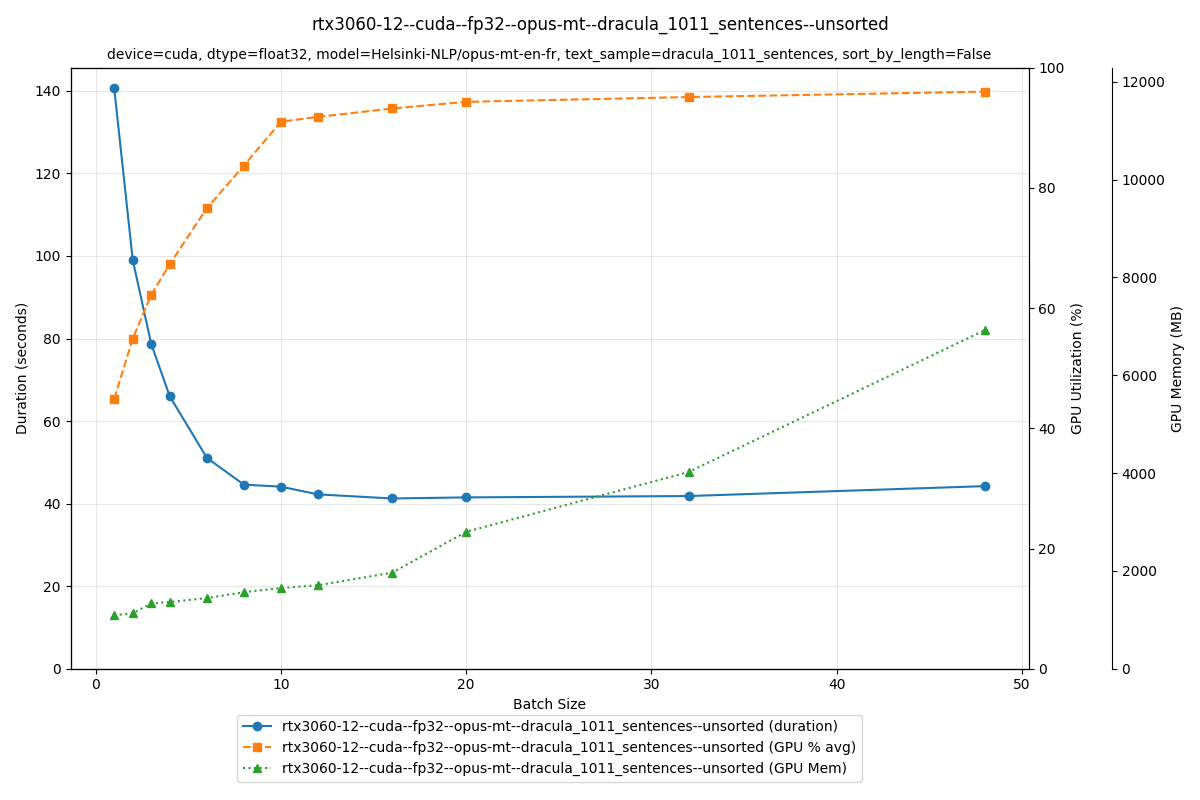
The plot shows duration (blue), GPU utilization (orange), and memory usage (green) across batch sizes.
The duration curve drops sharply as batch size increases, then flattens out. At batch size 1, translation takes 140 seconds; at batch size 16, it takes 40 seconds. That's a 3–4× speedup just from increasing batch size.
Why does it get faster? Look at the GPU utilization curve: at small batch sizes, the GPU never maxes out. There's room to feed it more data. As we increased batch size from 1 to 16, GPU utilization climbed from 65% to 95%. Memory usage rose too, from 1.5 GB to 2.5 GB.
By keeping the GPU busier, we get more work done in exchange for a bit more memory. That's the speedup.
Below is a screenshot of nvtop, a real-time GPU monitoring tool. It shows GPU utilization in light blue and memory usage in yellow while translating on an H100. The figures are similar to our RTX 3060 results.
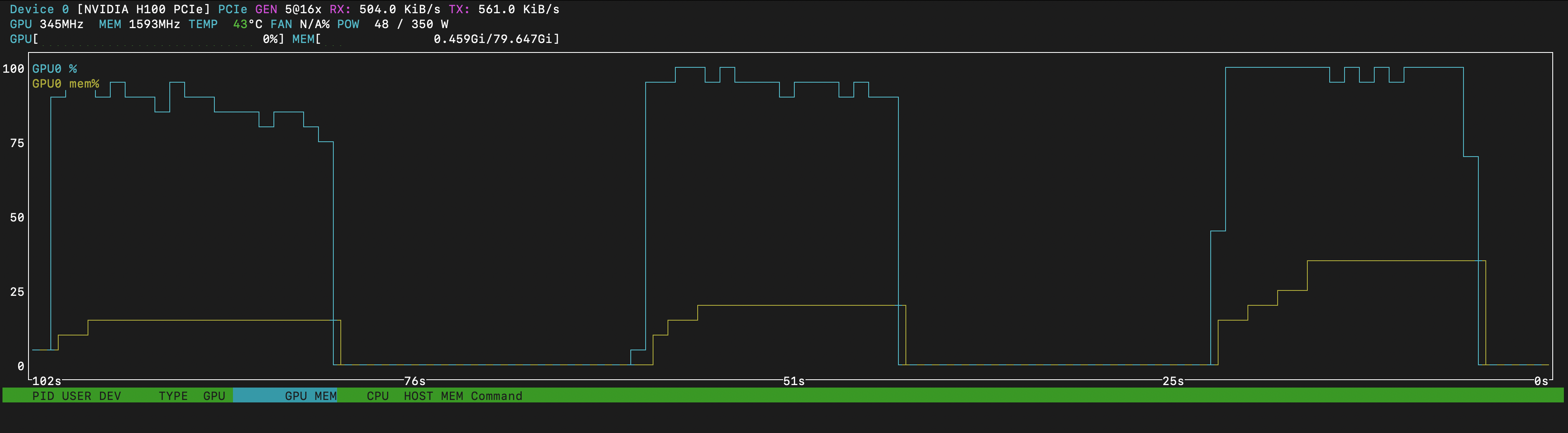
The screenshot captures three runs with increasing batch sizes. As batch size grows, GPU utilization ticks up slightly and memory usage rises. But the key observation: each successive run finishes faster.
Why does batching help?
This comes down to arithmetic intensity: the ratio of compute to memory access. With batch_size=1, the GPU loads model weights, processes one sentence, then idles while waiting for the next. It's memory-bound, meaning most time is spent moving data, not computing.
Larger batches amortize weight-loading across more sentences, keeping the tensor cores fed. We shift from memory-bound to compute-bound, which is where GPUs thrive. That's the jump from 65% to 95% utilization we saw earlier.
Mental model: increasing arithmetic intensity means less time waiting for memory, more time computing.
When we pass a batch of sentences to the model, all sentences get padded to match the longest one in the batch. Padding means wasted compute. Can we reduce it?
Here's a toy example with four sentences of varying lengths. (We're counting words for simplicity; actual tokenizers use subword units, but the idea is the same.)
| Sentence ID | Sentence | Length (words) |
|---|---|---|
| 1 | It rains | 2 |
| 2 | He forgot his keys at school again | 7 |
| 3 | The cat naps | 3 |
| 4 | She finally walked all the way to school | 8 |
Unsorted batches (batch_size=2)
We take sentences as they come. The short sentence (ID 1) gets padded to match its long neighbor, and the medium sentence (ID 3) gets padded to match the longest.
| Batch | ID | Visual (█=token, ░=pad) |
Useful | Padding |
|---|---|---|---|---|
| 1 | 1 | ██░░░░░ |
2 | 5 |
| 2 | ███████ |
7 | 0 | |
| Batch 1 Waste → | 5 | |||
| 2 | 3 | ███░░░░░ |
3 | 5 |
| 4 | ████████ |
8 | 0 | |
| Batch 2 Waste → | 5 |
Sorted batches (batch_size=2)
We sort by length first, grouping short sentences together (Batch 1) and long ones together (Batch 2).
| Batch | ID | Visual (█=token, ░=pad) |
Useful | Padding |
|---|---|---|---|---|
| 1 | 1 | ██░ |
2 | 1 |
| 3 | ███ |
3 | 0 | |
| Batch 1 Waste → | 1 | |||
| 2 | 2 | ███████░ |
7 | 1 |
| 4 | ████████ |
8 | 0 | |
| Batch 2 Waste → | 1 |
Sorting cuts total padding from 10 tokens to just 2.
The savings are obvious in this toy example. But does reducing padding translate to actual speedup on real data?
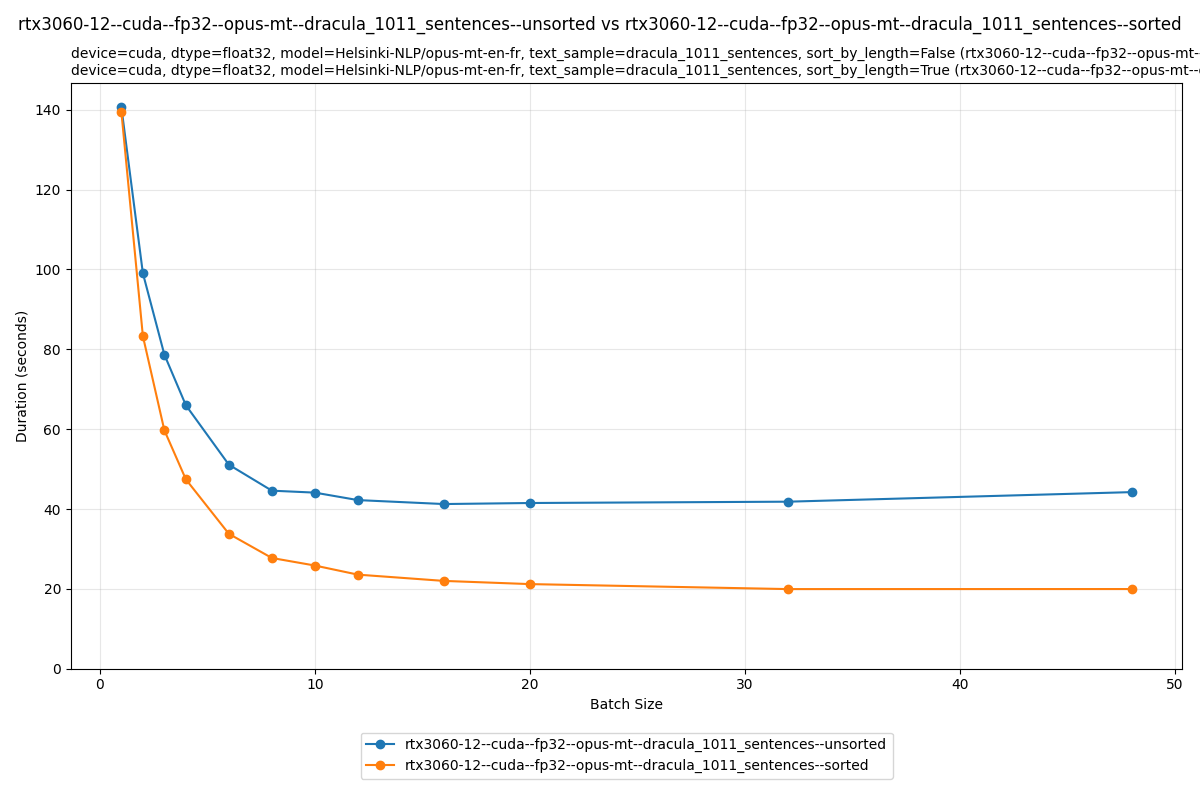
At batch size 16, the unsorted run takes 40 seconds; the sorted run takes 20 seconds. Sorting alone gives us a 2× speedup.
Why does sorting help?
Sorting reduces padding waste. Transformer self-attention is O(n²) in sequence length: a sequence twice as long costs four times the compute, even if half the tokens are just padding. By grouping similar-length sentences, we avoid the worst case where short sentences get padded to match a long outlier.
A caveat: standard self-attention is O(n²), but some implementations use optimizations like FlashAttention. Still, padding waste is never free.
Sorting itself costs almost nothing compared to inference time. A 2× speedup for minimal effort.
Mental model: padding isn't just wasted memory, it's wasted compute, and attention makes that cost quadratic.
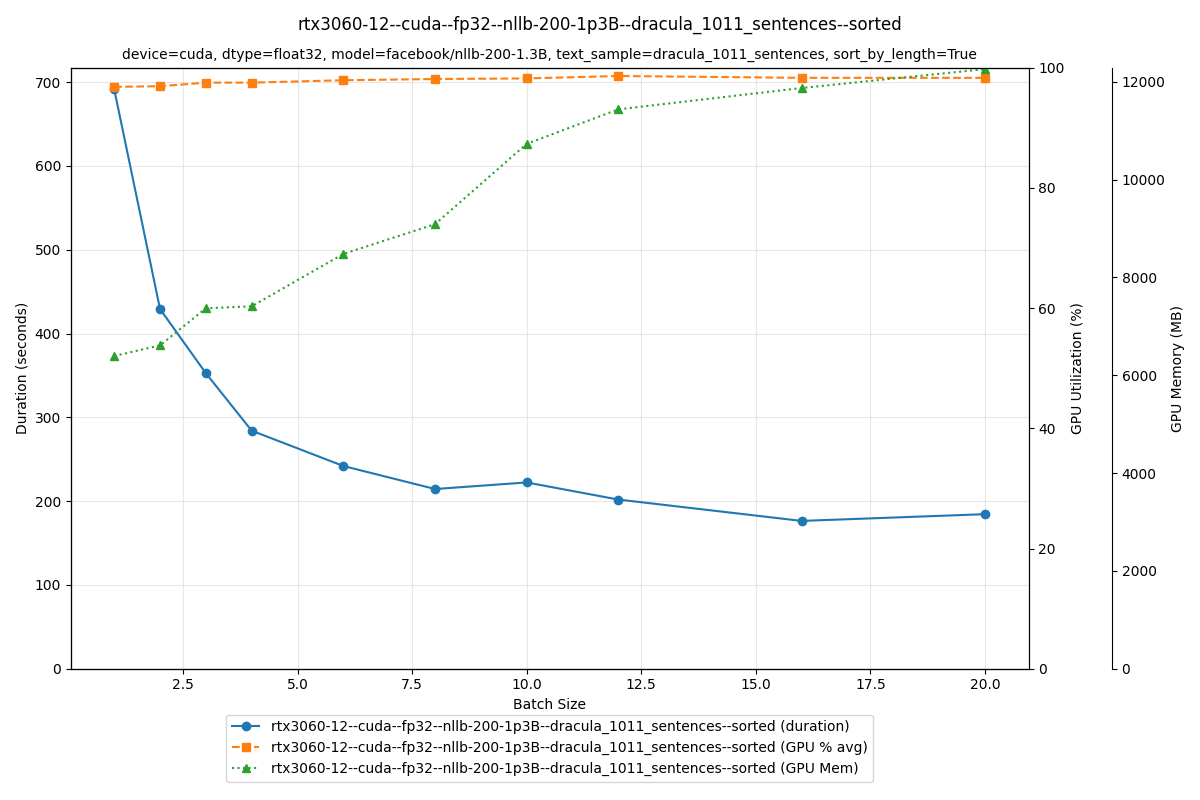
The larger NLLB-200 1.3B model is slower, but the trend holds: batching helps just as much. At batch size 1, translation takes 700 seconds; at batch size 16, it drops to 190 seconds. That's a 3.7× speedup from batching alone.
We've seen that batching and sorting dramatically speed up translation on an RTX 3060. But what if we throw datacenter hardware at the problem? We benchmarked three additional NVIDIA GPUs: the mid-range A10, the high-end A100, and the top-tier H100.
The A10, A100, and H100 were rented on OVH Cloud GPU Instances.
| GPU | VRAM | Mem BW | Tensor Cores | FP16 Tensor TFLOPS | TDP | MSRP |
|---|---|---|---|---|---|---|
| H100 | 80 GB | 2.0 TB/s | 528 | 989 | 350W | €27,000 |
| A100 | 80 GB | 2.0 TB/s | 432 | 312 | 300W | €18,000 |
| A10 | 24 GB | 600 GB/s | 288 | 125 | 150W | €3,600 |
| RTX 3060 | 12 GB | 360 GB/s | 112 | 51 | 170W | €300 |
Small model (Opus-MT)
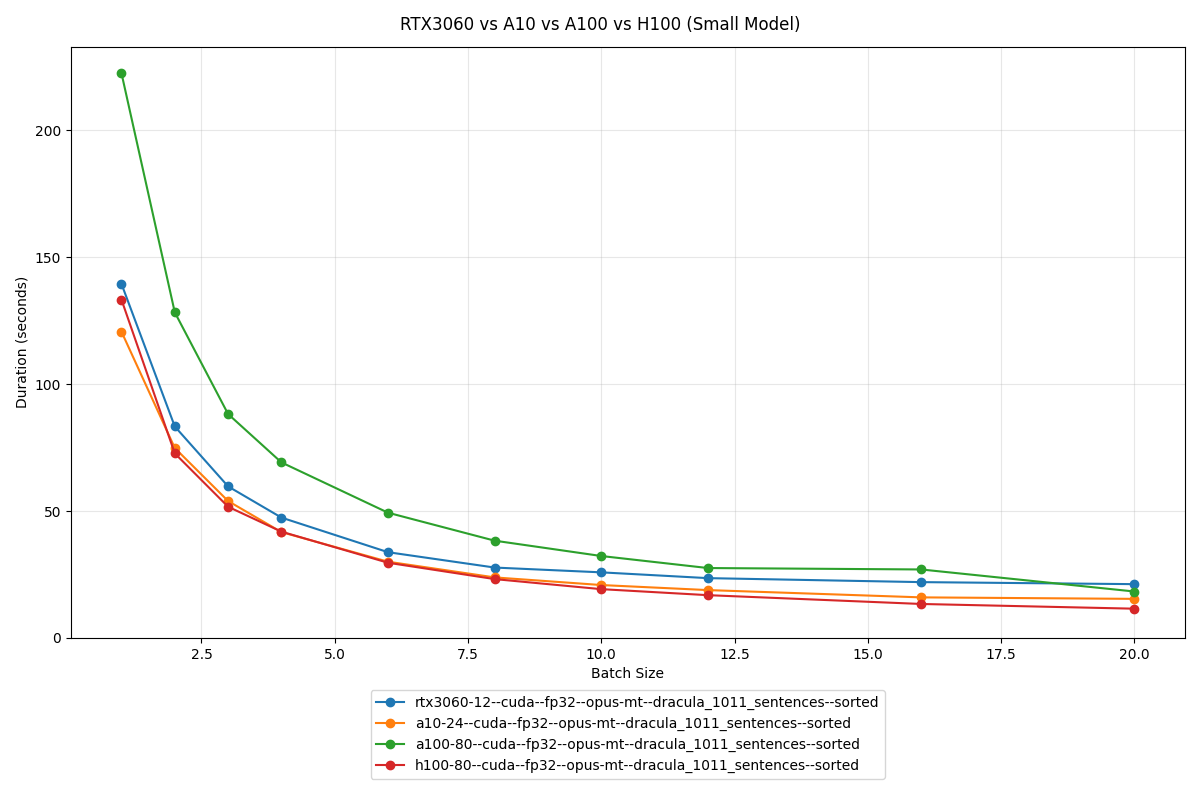
On the small model, all four GPUs finish within seconds of each other. Even the €300 RTX 3060 holds its own against the €27,000 H100.
Large model (NLLB-200 1.3B)
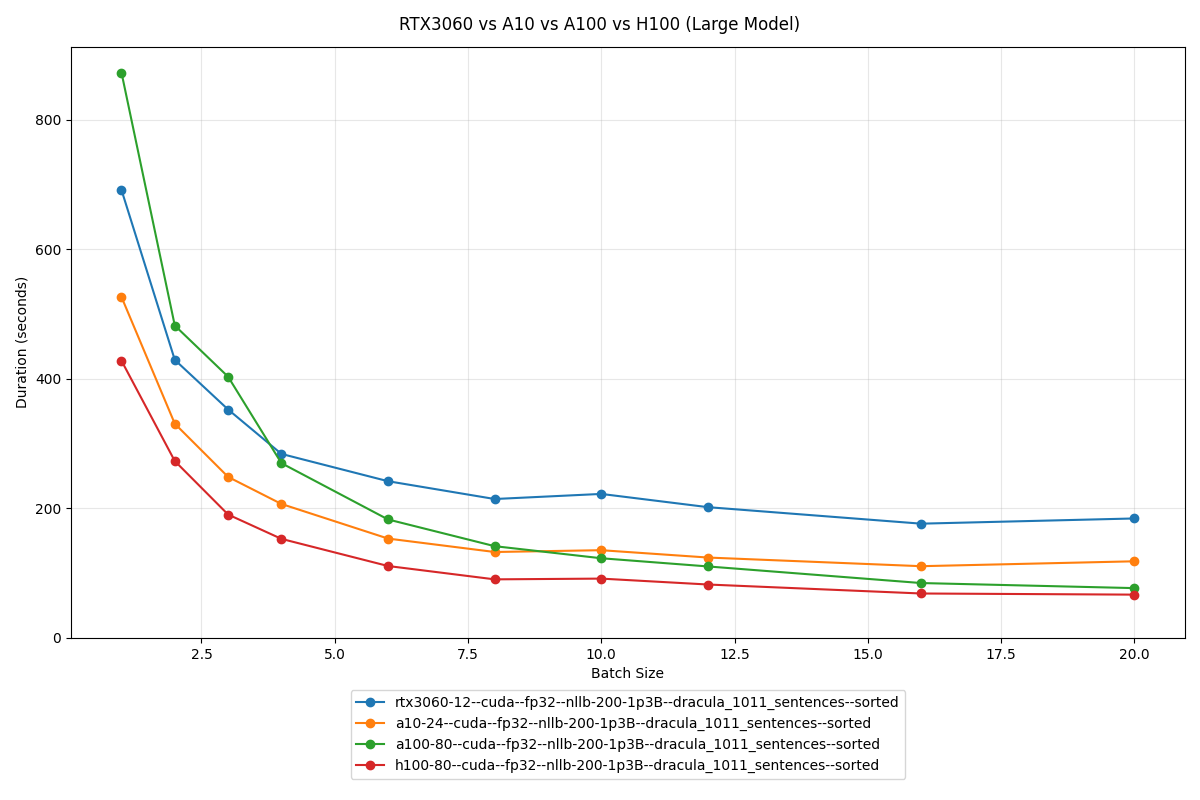
The gap widens with the larger model. The H100's memory bandwidth and tensor core count start to matter when there's more data to move around.
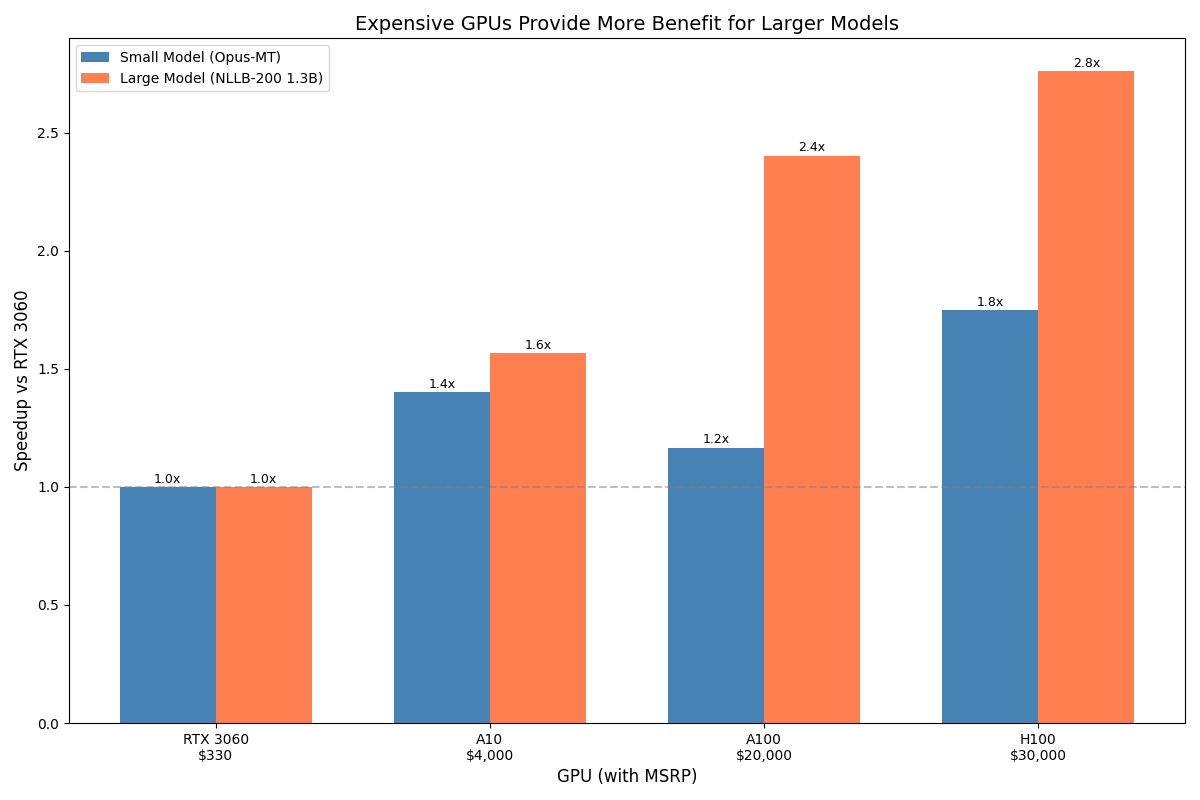
The mismatch problem
The results reveal something important: on small models, a €300 RTX 3060 nearly matches a €27,000 H100. Why?
Running a small model on an H100 is like delivering a pizza with a cargo truck. It works, but you're paying for capacity you can't use.
This isn't a minor inefficiency. If your workload fits on consumer hardware, datacenter GPUs are a waste of money. The optimizations we covered (batching, sorting) matter far more than the card you run them on.
Both optimizations come from the same principle: keep the GPU busy. Batching increases arithmetic intensity, meaning more compute per memory access. Sorting reduces padding waste, meaning fewer useless tokens eating quadratic attention cost.
These aren't novel techniques, but they're easy to overlook if you've never watched GPU utilization while your model runs.
What we didn't cover
There are other levers worth exploring: FP16 and mixed precision can halve memory usage and double throughput on supported hardware. Beam size and generation parameters can trade quality for speed. We also haven't touched torch.compile or dedicated inference runtimes like ONNX Runtime and TensorRT. Those deserve their own posts.
 THPVG
THPVG